

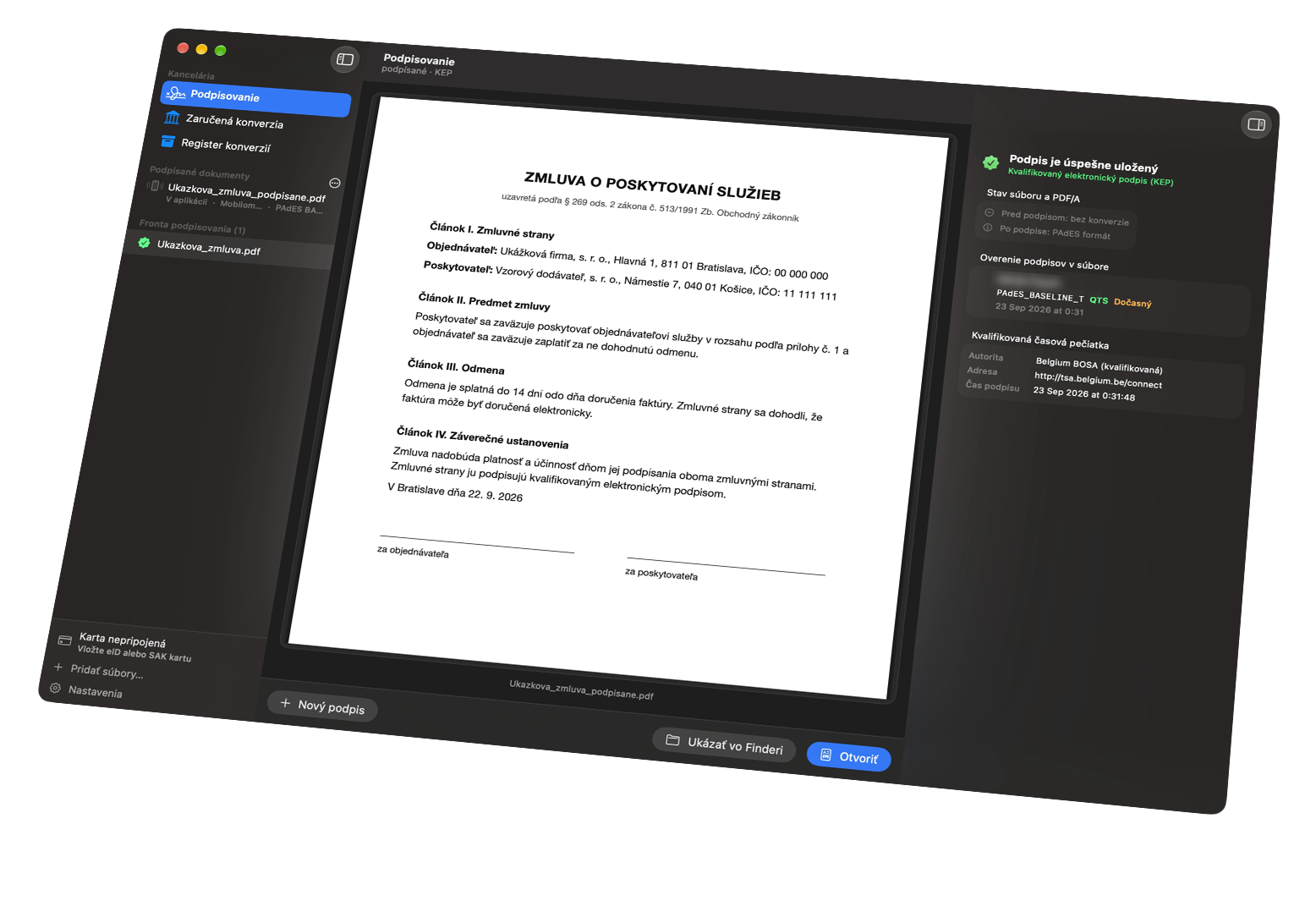

Chevron seven locked. Document signed.
Qualified signatures.
Native on the Mac.
Sign PDFs with an eID card, an I.CA card or an iPhone over NFC.
Your documents stay on your Mac.
 Source code on GitHub
macOS 27 · Apple Silicon · free · EUPL-1.2
Card
The Slovak eID card, I.CA SecureStore, the Slovak Bar Association card, Disig and other PKCS#11 cards. You enter the BOK in the eID client keyboard.
Phone
No reader needed: the Mac shows a QR code, Autogram v mobile reads your ID card and the signed document comes back to the Mac.
Safari
A Safari extension takes over signing on slovensko.sk and nove.slovensko.sk. You confirm every request in a Chevron7 window.
Signing the way you expect from a Mac.
Open a PDF with ⌘O, drop it on the window or sign it straight from Finder. Chevron7 shows the document, you pick a format and sign.
The stamp goes where it belongs. The visible stamp appears on the document and you drag it to the signature line. The signature stays inside the PDF (PAdES) or in an ASiC-E container, with a qualified timestamp at one switch.
On state portals. The Safari extension opens a Chevron7 window with the request’s origin and every page of the document. No open port: nothing is signed until you confirm with a card or a phone.
No reader needed. The Mac shows a QR code and an iPhone with Autogram v mobile signs with the chip of your ID card over NFC. The Slovensko.Digital server decrypts the document only in memory and deletes it within 24 hours.
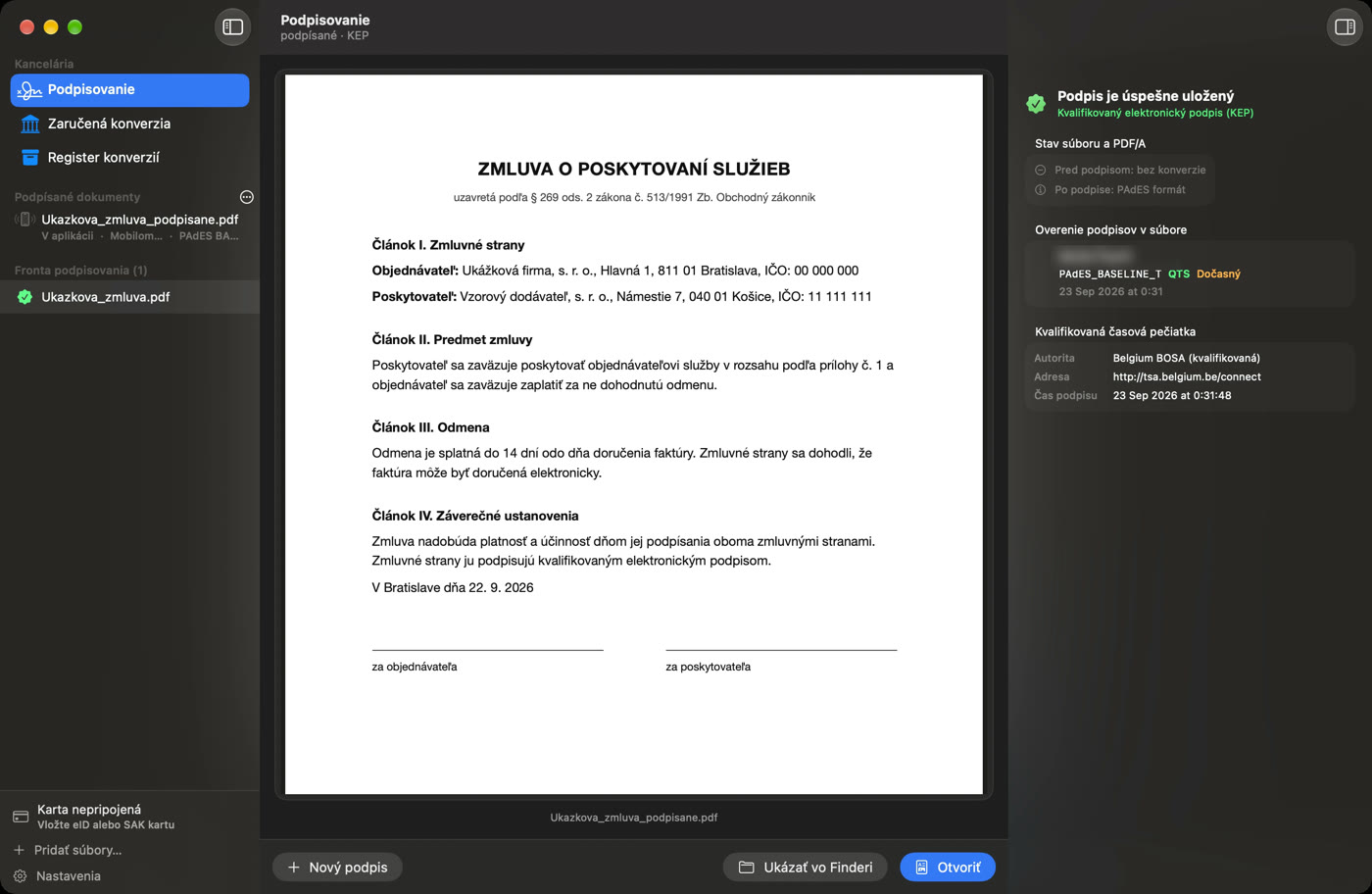
Validated and saved. Right after signing, Chevron7 validates the format, the timestamp and its authority. The signed file lands next to the original, with the suffix _podpisane.
Real app recordings with sample documents. The QR code and the signer’s name are hidden on purpose. The app is in Slovak.
What happens when you sign.
Three routes to the same qualified signature. The document stays on your Mac, except on the phone route, where it passes encrypted through a server and is gone within 24 hours.
PDF on your Mac
via ⌘O, Finder or SafariChevron7
shows the document and formatCard in the reader
PIN or BOK confirms the signatureTimestamp
the authority gets only a fingerprintSigned PDF
validated, next to the original
The Mac encrypts
with a random key only it knowsSlovensko.Digital server
decrypts in memory only, deletes within 24 hQR code
scanned with an iPhoneID card over NFC
Autogram v mobile signsBack on the Mac
downloaded, validated, saved
State portal
slovensko.sk, nove.slovensko.skSafari extension
takes over signingNative messaging
no open portChevron7 window
origin, pages, confirmationSigned for the portal
with a card or a phone
You choose the format (PAdES, ASiC-E, XAdES) and the qualified timestamp; on a state portal, the portal decides.
Your documents stay on your Mac.
The signing engine runs as a local process. Only what you choose leaves the Mac:
- sent
- signed
- deleted within 24 h
Signing with a phone: the encrypted document passes through the Slovensko.Digital server and is gone within 24 hours.
Timestamps: the authority receives only a fingerprint of the document, never the document.
Signature validation: the app consults the EU trusted lists.
External AI models: only if you explicitly turn them on for guaranteed conversion.
For advocates: guaranteed conversion.
From a paper original to an electronic document under Slovak Act No. 305/2013 Z. z., from the scan to authorization with a mandate certificate. 16 kinds of security elements, from stamps and signatures to binding cords, tapes and seals.
Import. A controlled import and confirmation of the original’s provenance.
Analysis. Security element detection on the Mac itself, in three layers.
Review. The AI only suggests. The advocate reviews every non-blank page.
Clause. The attestation clause with its eight statutory fields, PDF/A-2b and XML.
Authorization. A mandate certificate and an evidence number straight from EZZK.
It learns from your review.
One real run on two sample documents from made-up companies: a tricolour binding cord, a seal, stamps, signatures and a paraph.
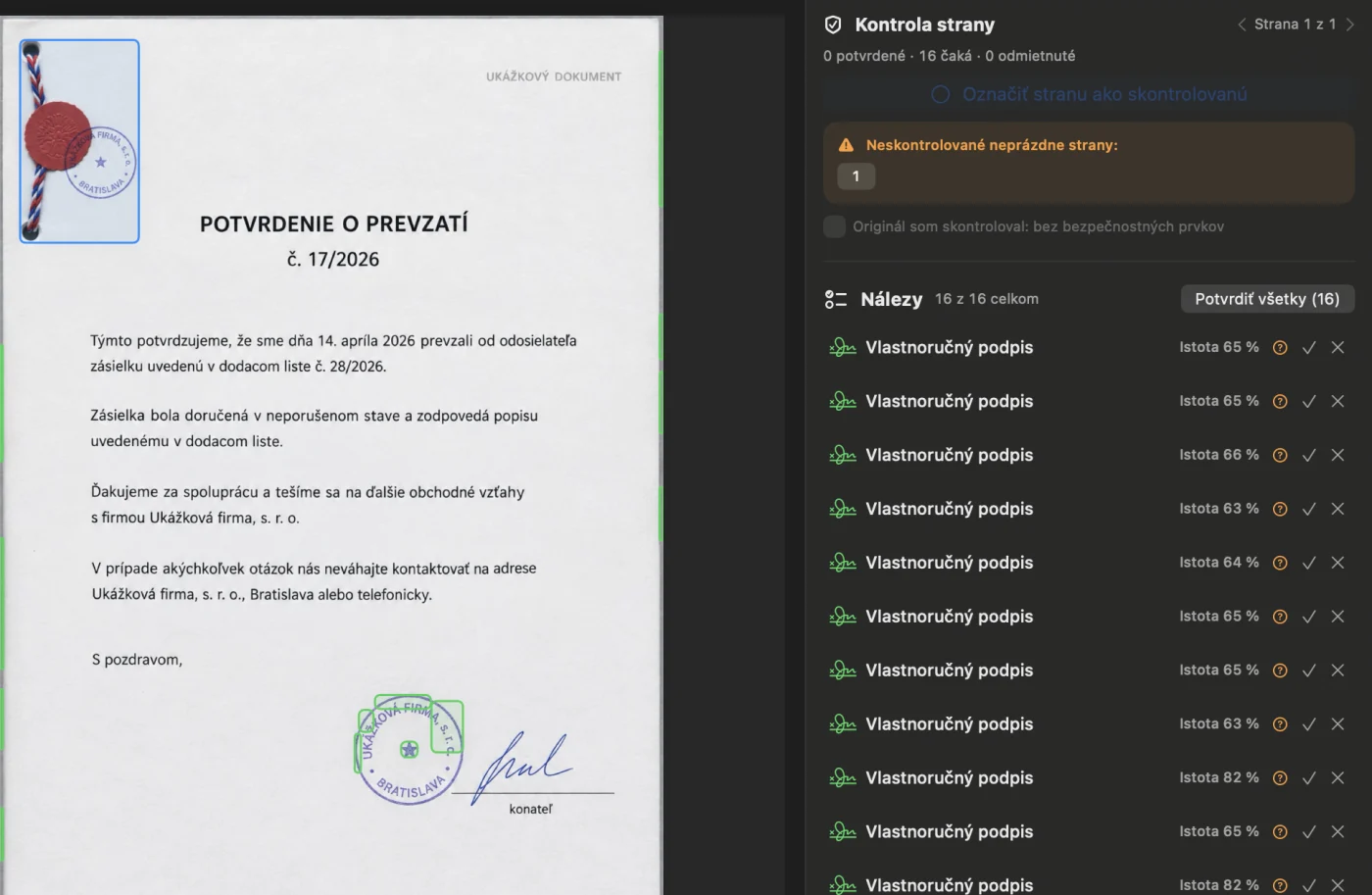
Detection suggests, a person decides. On a new document it suggested 16 findings. It merged the cord, the seal and the top stamp into one box, caught the lower stamp only in fragments and mislabelled them as signatures, and flagged false findings on the page edges. It missed the signature and the paraph.
Every decision is an example. The advocate rejected 14 findings, corrected the boxes and added what was missing: the cord, the seal, two stamps, the signature and the paraph. Confirmed and rejected crops are saved as examples, on this Mac only.
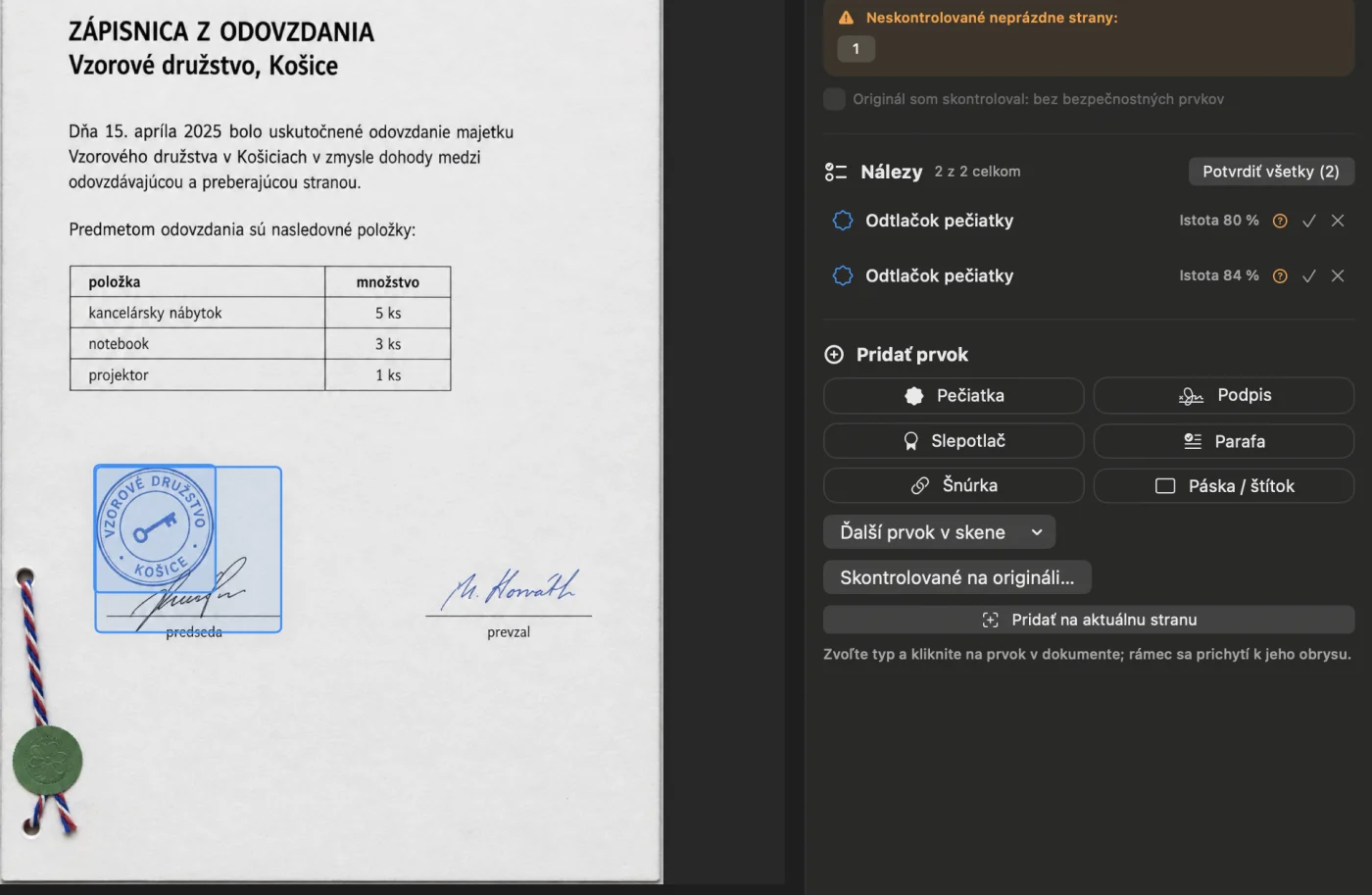
Cleaner on the next document. On a different document with a different layout it suggested the stamp correctly as a stamp and nothing on the page edges. The cord, the seal and the signatures were still added by a person.


This is not an accuracy benchmark. The benefit of new examples has to be verified on more scans, and the advocate always reviews every non-blank page. The sample documents are generated images; the app is in Slovak. Where it stands today: EZZK works on the test environment. Production supports login, server time and record lookup so far. Sending records to CEZZK is not finished yet.
Get Chevron7.
Free, with open source code under the EUPL-1.2 licence.
You will need
- macOS 27 or later
- a Mac with Apple Silicon
- a card reader with the driver for your card (the eID client for the Slovak ID card), or an iPhone with Autogram v mobile
Chevron7 is free. If it saves you time, you can support its development.